Listening task 1: Electronic devices
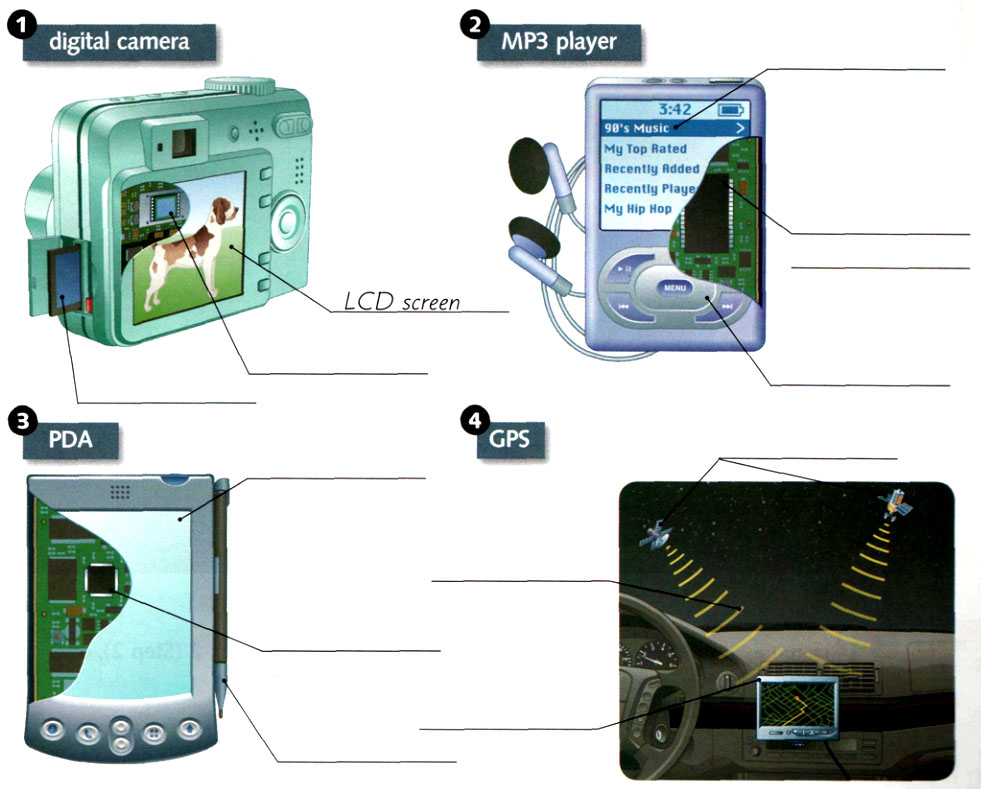
A Listen. People are talking about electronic devices. What are the different parts? Label the pictures with the correct parts from the box.
digital signal processor keypad playlist satellites
flash memory LCD screen radio waves stylus
image sensor microprocessor GPS receiver touch screen
Show answers & Audioscripts
from top to bottom
1) LCD screen, image sensor, flash memory
2) playlist, digital signal processor; keypad
3) touch screen, microprocessor, stylus
4) satellites, radio waves, GPS receiver
Audioscripts inb below
BListen again. Complete the sentences with the correct parts.
1) The ________ stores the pictures.
2) The ________ displays the songs.
3) The ________ retrieves and stores information.
4) _____ send radio waves.
Show answers & Audioscripts
1) flash memory
2) playlist
3) microprocessor
4) Satellites
Audioscripts
1) digital camera
Man : Hey. Check this out. I just got it yesterday.
Woman : Ooh, a digital camera. Wow! That looks like a complicated one.
Man : Well, actually, it’s a lot more convenient than a traditional film camera. With a digital camera, you can look at your pictures and decide if you want to save them before you print them or e-mail them. You view them right here on the LCD screen. LCD stands for “liquid crystal display.” See? That’s a picture of dog.
Woman : Nice! So, how does it work? I mean, how does the camera take pictures and store them?
Man : Well, first, the image sensor creates the pictures. The image sensor is a little square chip inside the camera. It turns light into electricity and creates an image. Then the flash memory stores the pictures. This is the flash memory right here on the side. See the red button next to it? You push the button, remove the flash memory, and then you can save, print, or e-mail your pictures.
Woman : Amazing. So, how much did it cost?
Man : Um, let’s not talk about that.
2) MP3 player
Man : Tanya!
Tanya : Yeah?
Man : Can I borrow your MP3 player? I’m thinking of buying one, but I want to try yours first.
Tanya : Sure. It’s right here. Just let me explain a few things first. OK. It’s on. Look at the screen. See? That’s the playlist. It displays the categories of all songs. It’s all favorite music I’ve downloaded from computer.
Man : Cool.
Tanya : When you want to listen to music, you use the keypad to choose the songs you want to hear. See the keypad buttons here? These are the main controls. Press the “Play” arrow.
Man : OK. That’s easy enough. What do I do next?
Tanya : Here. Put these headphones on. When you press “Play,” the digital signal goes to the digital signal processor. That’s a large rectangular computer chip inside the MP3 player. The digital signal processor turns the signal into music. Well, I think that’s all you need to know. Any questions? I said, any questions?
Man : What? Oh, sorry, I couldn’t hear you. Great playlist! Um, what did you say?
3) PDA
Woman : Well, I’m all ready for new job. I’ll be on time for all meetings with new PDA.
Man : PDA? What’s that?
Woman : A personal digital assistant. You’ve never heard of them? They’re the coolest things. I can store addresses, schedules, take notes. They’re great.
Man : Hey, that’s pretty neat. Show me how it works.
Woman : OK. First, you use the stylus to select the function from the menu. The stylus is like a little pencil. It’s this thing on the side here. You use that to input the information. You just touch it directly on the screen, like this. See? This is a special kind of screen. It’s called a touch screen. Here. Let’s choose “Address book.” After you select the function, the information goes to the microprocessor. It’s a little, square chip inside the PDA. It’s like the computer’s brain. The microprocessor retrieves and stores information. See? There they are, all phone numbers and addresses! Oh, here. I’ll put in your phone number. What is it?
Man : Seven-oh-four, five-five-five, nine-one-oh-two.
Woman : Got it. Isn’t this so convenient? I’ve got all phone numbers in here.
Man : Great! Maybe now you’ll return phone messages!
4) GPS
Man : So, what do you think of new car?
Woman : It’s pretty high tech. What’s this thing on the dashboard?
Man : That’s car’s GPS. It’s the navigation system. I love it! I always know exactly where I am and where I’m going. I never get lost.
Woman : GPS?
Man : GPS stands for “Global Positioning System.” See, there are satellites way up in the sky. The satellites are always up there moving around the earth. This part here, the part you put inside the car, is called the GPS receiver. Here’s how it works. First, satellites send radio waves to the GPS receiver. The GPS receiver reads the information signals from several satellites in different locations. Then the receiver uses a formula to calculate its distance and position, so you can find out the car’s exact location – anytime, anywhere.
Woman : Well, I guess it is a pretty neat device. But, it doesn’t seem to work very well.
Man : What do you mean?
Woman : Uh, you were supposed to turn left back there.
Listening task 2: How a vending machine works
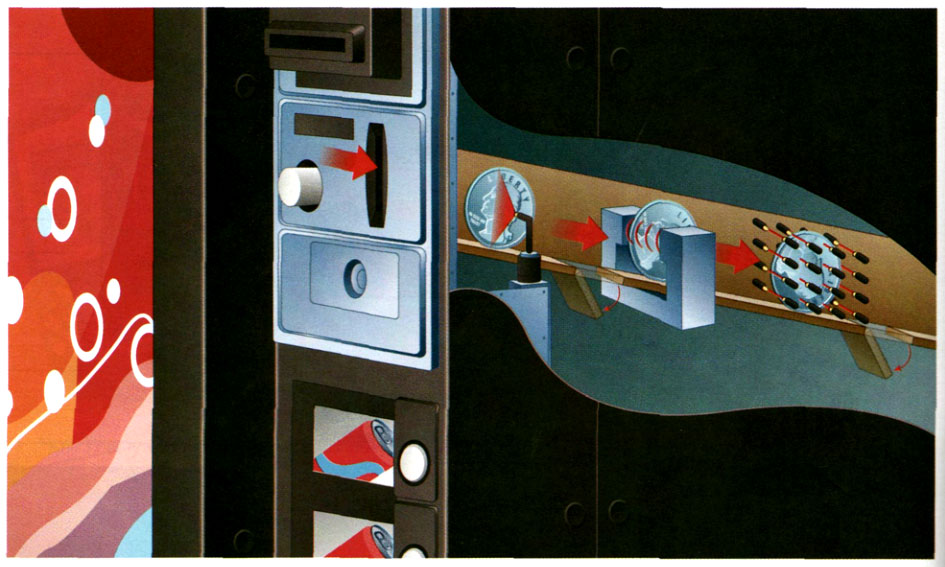
A Listen. How does a vending machine work? What does it check for in each step? Complete the phrases.
Step 1: what ______ of ______ the coin is made of
Step 2: how ______ the coin ______
Step 3: how ______ or ______ the coin is
Show answers & Audioscripts
Step 1: what type of metal the coin is made of
Step 2: how much the coin weighs
Step 3: how big or small the coin is
Audioscripts inb below
BListen again. When do these things happen? Write 1 (Step 1), 2 (Step 2), or 3 (Step 3). (There is one extra item.)
___ Lights check the color of the coin.
___ The coin goes between two ends of the magnet.
___ The coin passes between two sets of lights.
_1_ The coin in the money slot goes down a chute.
___ A magnetic field slows down the coin.
_1_ Electricity passes through the coin.
___ Lights measure the size of the coin.
Show answers & Audioscripts
X Lights check the color of the coin.
2) The coin goes between two ends of the magnet.
3) The coin passes between two sets of lights.
1) The coin in the money slot goes down a chute.
2) A magnetic field slows down the coin.
1) Electricity passes through the coin.
3) Lights measure the size of the coin.
Audioscripts
Step 1.
Woman : Did you ever wonder how a vending machine knows that you’ve put the correct coin in? Basically, the machine uses three steps to check for three main characteristics of each coin as it passes through the inside. When the coin passes the test for all three steps, the coin is accepted, and you can buy the product.
Here’s how a vending machine works. In the first step, the machine checks what type of metal the coin is made of. Coins are made of different metals. If the coin is the wrong type of metal, it is not accepted. How does the machine know? It uses electricity. When you put a coin into the money slot of a vending machine, it goes down a chute. Inside the chute, electricity passes through the coin. If the coin is the wrong metal, the electricity won’t pass through it, and the coin will be returned. If the coin is made of the correct metal, the coin continues to the second step.
Step 2.
Woman : In the second step, the coin goes between two ends of a magnet. This produces a magnetic field which slows down the coin. Different coins slow down at different speeds, depending on the weight of the coin. So in this step, the machine is checking for how much the coin weighs – or how heavy it is. If the coin slows down too much, it is too heavy. If it moves too quickly, it is too light, and the machine does not accept the coin. If the coin weighs the correct amount, it moves on to the next step.
Step 3.
Woman : In the last step, the coin passes between two sets of lights. This is how the machine checks one more important characteristic: how big or small the coin is. The lights measure the exact size of the coin. If the coin is too big or too small, the machine does not accept it, and it is returned.
If all three of these characteristics – the metal, the weight, and the size of the coin – are correct, the machine will accept your coin, and you can enjoy your vending machine purchase!
Listening task 3
A Listen. People are talking about electronic devices. Check (✓) two things each device can do.
1) store addresses
make phone calls
download video games
2) download maps
make phone calls
connect to a computer
3) take pictures
send pictures
store addresses
4) download movies
take digital pictures
make DVDs
5) play music
download songs
store pictures
Show answers & Audioscripts
1) store addresses, make phone calls
2) download maps, connect to a computer
3) take pictures, send pictures
4) take digital pictures, make DVDs
5) play music, download songs
Audioscripts inb below
BListen again. Complete the missing information.
1) Touch the screen ______ to turn it on.
2) The signals indicate ______ of the car.
3) It uses the e-mail function to ______.
4) This model ______ while you’re recording.
5) The digital signal processor had ______.
Show answers & Audioscripts
1) with the stylus
2) the location
3) send pictures
4) makes the DVD
5) to be replaced
Audioscripts
1)
Woman : Check out new PDA. It can store a lot of information: addresses, phone numbers.
Man : How does it work?
Woman : Here you go. Touch the screen with the stylus to turn it on.
Man : So, what are these buttons down here for?
Woman : That’s the keypad for the cell phone.
Man : Wow! This is really nice.
2)
Man : Look, I got a GPS!
Woman : That’s great. How do these things work anyway?
Man : Well, the GPS receiver reads signals from satellites in the sky. The signals indicate the location of the car. For our trip today, I downloaded the map and directions from computer.
Woman : It connects to your computer?
Man : Yeah.
Woman : Wow! Now I’m impressed.
3)
Woman : I can’t figure out how to use new cell phone.
Man : Don’t you just press the numbers and make your call?
Woman : I know how to make calls; I want to take pictures with it.
Man : Let me take a look.
Woman : You did it! Hey! That’s a pretty good picture of me. Let’s send it to Jim. How do I do that?
Man : Let’s see. It uses the e-mail function to send pictures, so ___
4)
Store clerk : Can I help you?
Woman : Yes. I’d like to see some video cameras.
Store clerk : This one’s very popular. It can take digital pictures as well as video.
Woman : OK. And how do I put the videos onto a DVD?
Store clerk : Oh, this model makes the DVD while you’re recording.
Woman : Great. And how much is it?
5) [on the phone]
Man : Hello?
Woman : Hi, this is Carl’s Computers. We’ve finished fixing your MP3 player.
Man : Great. So, what was wrong with it?
Woman : The digital signal processor had to be replaced. That’s why it wouldn’t play music.
Man : OK, I’ll pick it up today. I’ve got some songs I want to download tonight.